How to Use the TinyMight 2: First Use, Loading and Everyday Tips
To use a TinyMight 2: charge it with a USB-C charger rated for at least 2 A, check the 18650 battery is seated, pull out the glass tube and place ground herb on the screen, push the tube back, set the temperature dial above its lowest settings, then press the button three times to switch on. In on-demand mode you hold the button and inhale after the vibration; in session mode the device keeps heating until you switch it off. The steps below follow the maker's operating instructions and guide.
This is a beginner walk-through. For accessories see our TinyMight 2 accessories guide, and for more articles visit the TinyMight hub.
- What you need
- Charging and battery
- Loading the tube
- Switching on and choosing a mode
- Temperature dial
- Beast mode, stealth mode and turning off
- Everyday tips
- A simple first session
- If it does not start

1. What You Need
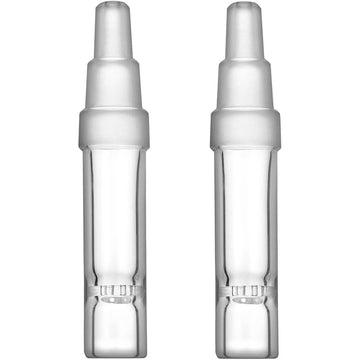
According to the manufacturer's guide, the TinyMight 2 comes with a 55 mm glass tube, a cooling unit, a Molicel high-current 18650 battery, a spare-parts kit with O-rings and screens, a USB-C to USB-C cable, a carrying pouch and the instruction manual. The manual also shows a multitool, which is used to move the cooling unit. A titanium stem is included on some editions. You also need dry herb ground medium-fine and a USB-C charger that can supply at least 2 A.
2. Charging and Battery
Plug a USB cable into the charging connector. The red charge LED stays on while the battery charges and turns off when it is done. The maker says charging from empty to about 90% takes around 1.5 hours with a charger that can supply at least 2 A. It is normal for the aluminium bottom panel to get warm because it works as a heatsink.
The battery is a removable 18650. Open the battery lid by turning it anti-clockwise and fit the cell with the positive end facing the lid. If the lid turns stiffly, the manual suggests a little oil on the threads. The device draws a lot of current, so the manufacturer recommends Molicel P26A, P28A or P30B cells, and says any replacement must be a high-quality, high-current 18650 that can deliver over 20 A continuously.
3. Loading the Tube
- Hold the unit upside down and pull out the glass tube.
- Place your ground herb on the screen. A medium-fine grind is the maker's advice.
- Still holding it upside down, push the tube back into the unit.
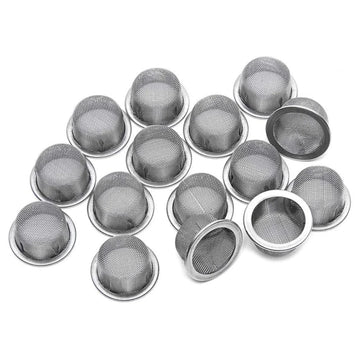
You can change the chamber size by moving the cooling unit inside the glass tube. Use the multitool and push on the solid sides of the cooling unit, never on the mesh screen. The same multitool can empty the chamber, stir the contents or tamp them down. If you use a different stem, make sure its screen sits securely, since the maker warns a loose screen can reach the heater. Our classic short stem and classic XL stem have the screen built into the glass, and spare basket screens are available if you prefer a separate screen.
4. Switching On and Choosing a Mode
Press the button three times quickly to switch on. The way you press decides the mode:
- On-demand: press three times and release. Hold the button to heat, inhale once the unit has vibrated, then release the button. The heater only runs while you hold it.
- Session: press three times and keep the button held until the vibration stops. The unit then heats up and holds a stable temperature until you turn it off. Holding the button boosts the temperature.
The TinyMight 2 is a full convection device, so the manual notes you need a slightly longer inhalation for the herb to reach the set temperature. The manufacturer calls on-demand its fastest and most battery-efficient way to use the device.
5. The Temperature Dial
The dial is on the bottom panel. At 0 the lock is active and the unit cannot be turned on. The maker's troubleshooting page adds that the dial must be above level 2 for the device to start, so if nothing happens, check that first. The manual's default levels are:
| Dial level | Temperature |
|---|---|
| 1 | 140 °C |
| 2 | 150 °C |
| 3 | 160 °C |
| 4 | 170 °C |
| 5 | 180 °C |
| 6 | 190 °C |
| 7 | 200 °C |
| 8 | 210 °C |
| 9 | 220 °C |
| 10 | 250 °C (session mode is limited to 230 °C) |
The manufacturer's current website describes the range differently, as roughly 20 steps between 120 and 240 °C, and the manual says the whole range can be shifted up or down in a recalibration procedure. If your readings differ from the table, your unit may be set to a different range. In general, lower settings favor flavor and higher settings give denser vapor.
6. Beast Mode, Stealth Mode and Turning Off
Battery level. When you switch on, the unit shows the charge with light colors and vibrations: green with four vibrations is full, blue is three, purple is two and red is one.
Beast mode. Turn the dial to maximum and the lights turn white instead of showing the battery level. It gives the highest heat and is available only in on-demand mode. The manual says to be careful, as it is much hotter than level 9.
Stealth mode. To turn the lights off, start in session mode, turn the dial to maximum and press the button once, then turn it to minimum and press once more. Opening and closing the battery lid resets this.
Turning off. Press the button three times.
7. Everyday Tips
- Clean regularly. The glass tube can be washed with water and detergent or soaked in isopropyl alcohol. Keep the O-rings out of solvent. Our guide to cleaning basket screens covers the mesh.
- O-rings. The cooling unit uses two different sizes, one smaller and one slightly larger.
- Do not remove the big screw. The manual says the large screw at the bottom of the cooling unit is not meant to be removed.
- If vapor drops. Read our article on weak vapor on the TinyMight 2 before changing settings.
- Keep spares. A second battery and a few screens save a session. See the TinyMight 2 accessories collection for stems and screens.
8. A Simple First Session
- Charge until the red LED goes out and check the battery lid is closed.
- Load a small amount of medium-fine herb on the screen and push the tube back in.
- Set the dial to a middle level, such as 5 or 6 in the table above.
- Press three times to switch on in on-demand mode.
- Hold the button, wait for the vibration, and draw slowly and for a little longer than a normal sip, as the manual advises for a full convection device.
- Release the button, then adjust the dial one step at a time to taste.
- Switch off with three presses and let the tube cool before you empty it.
9. If It Does Not Start
The manufacturer's own troubleshooting page lists these first checks: the dial is above level 2; the battery is a fully charged, recommended cell; and the charger can supply at least 2 A. If the dial turns freely without any effect, if the unit will not start with a known-good battery, or if it will not charge after you have ruled out the cable and charger, the maker says the device needs to go back for repair rather than be opened at home. If the vibration has stopped, a silent mode can be switched on by accident; opening and closing the battery lid resets it.
Final Thoughts
The TinyMight 2 is simple once you know its routine: charge, load, three presses, choose a mode and adjust the dial. Start in the middle of the dial, draw slowly and a little longer than a normal sip, and make small changes. When something stops working, work through the maker's checklist before opening the unit.